Accessing the Aircraft Module from other areas in FOS
The main menu is where the entire Aircraft module can be launched from. A specific tail number may also be accessed from various areas within FOS.
Accessing from the Schedule Board:
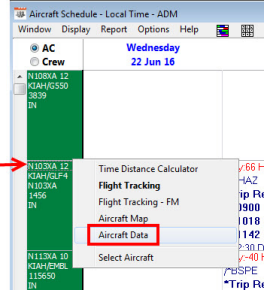
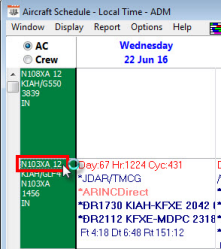
"Right click" and select Aircraft Data, or double click on the tail number within the schedule to open the Aircraft Information Screen.
a) Right clicking and selecting Aircraft Data:
b) Double click tail number:
Accessing from the Aircraft ID:
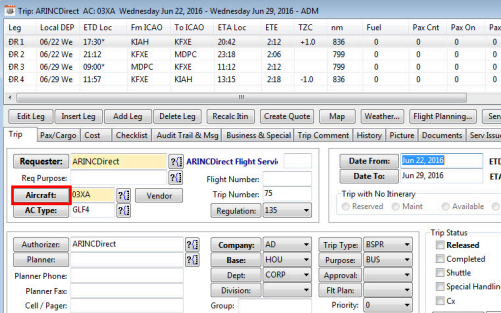
You may access the aircraft data from any field where the Aircraft ID is available. a) Selecting the Aircraft button within a trip:
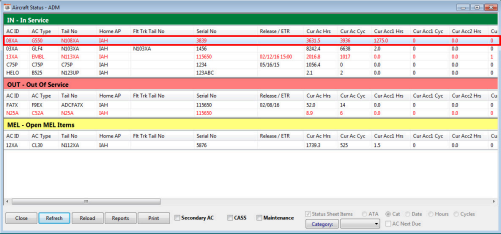
From the Ac Status page:
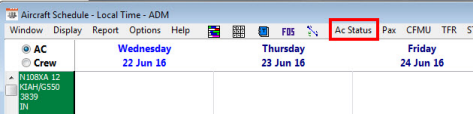
a) Selecting the Ac Status button off the FOS Schedule board will open the status list of aircraft:
b) Next, double-click on any aircraft line and it will open the aircraft data page:
Related Articles
Aircraft Types Module Overview
Aircraft Types Module Overview What is Aircraft Types? Aircraft type data is generally used to define the data and performance for each type of aircraft in your fleet. The information entered here will affect many facets of FOS scheduling and ...Accessing the Passenger Module from other areas in FOS
ACCESSING THE PASSENGER MODULE FROM OTHER AREAS IN FOS A specific passenger record may also be accessed from trips and quotes within FOS. Accessing from the Personnel ID You may access the personnel data from the passenger tab in the quote, trip, or ...Accessing the Personnel Module from other areas in FOS
Aside from the FOS Main Menu > Personnel Module button, a specific personnel record may also be accessed from various areas within FOS. Accessing from the Schedule Board After setting the radio button to Crew, right click and select, or double click, ...Airport Module Overview
Accessing the Airports Module To access under the Aircraft Module select the Operations Tab and then the Airports button: You can perform searches of the database by using the fields as shown below. By using these fields, the data you are requesting ...Accessing the Module