Adding a Default Checklist to Passengers, Aircraft, and Aircraft Types
Passenger Checklists
Once a checklist group and items for a specific passenger have been created it may be added within their passenger record. There are two places in the passenger record where this can be accomplished.
On the Report Tab select the lookup button tot he right of the "Default Checklist Group". This will open the checklist module where the appropriate checklist can be selected.
On the ApServ/Cklist Tab selecting the "+" button will only add a preferred FBO services. To add additional default checklist groups here you must right click and select "New Checklist Group" from the menu. This will open the checklist module where the appropriate checklist group can be selected.
Aircraft Checklists
There is only one place for default checklists to be added within aircraft records.
On the Cklist Tab select the "+" or right click and select "New Checklist Group" to add the default checklist to the aircraft. Once either of these is selected the Checklist module will open where the default checklist may be selected.
Aircraft Type Checklists
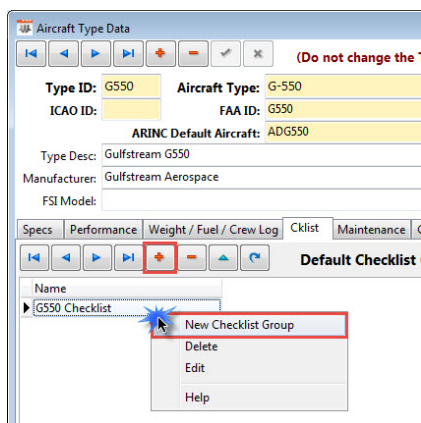
There is only one place for default checklists to be added within aircraft type records.
On the Cklist Tab select the "+" or right click and select "New Checklist Group" to add the default checklist to the aircraft type. Once either of these is selected the Checklist module will open where the default checklist may be selected.