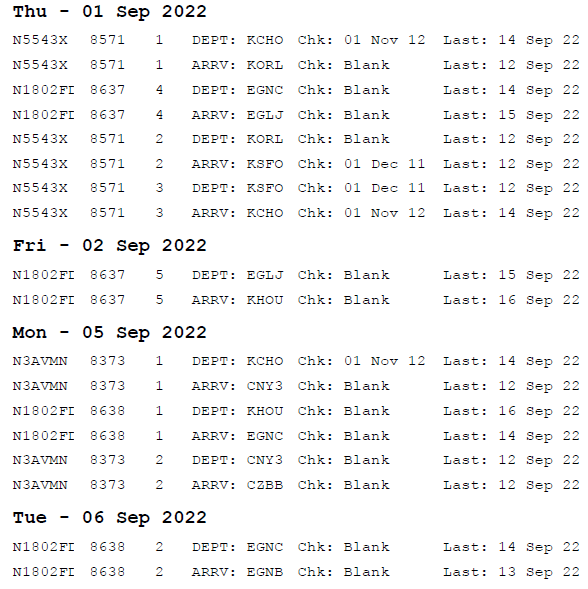
Airport Safety Check / Airport Last Updated
Report Name: easblckberry_apcheck.rpt
Portrait or Landscape: Portrait
Report Group: Scheduling
Comments:
Run report over date range to show airport safety check date and airport last updated date;
Chk = Airport safety check date;
Last = Airport last update date;
Formatted to fit blackberry originally but can also be exported to excel;
Related Articles
Airport Tab
The airport data in FOS is composed of information from a third party vendor. The information is updated on a quarterly basis. Fields in blue throughout the Airport Database note the fields that are imported from the third party database. If the ...Setting Up the Flight Safety Interface
Overview The FlightSafety interface allows FOS to retrieve training completion dates as crewmembers complete various training events. If set up properly, users should only have to certify training items as the training completion date will already be ...Airport Update - Automation Setup
As of 3.15.4, airport updates can now be automated. Below are the instructions for setting up the airport update automation. Notes: With the release of FOS version 3.14.3, airport data will be provided by Universal Aviation. Any new data is released ...Creating an Airport Operational Message
To add an airport operational message, please see the steps below. 1. Open the appropriate airport record. Select the "OpMsg" tab. 2. Select the red "+" near the appropriate heading: Airport Operational Message - This message will only apply to the ...Airport Tab
The “Airport” Tab contains options specific to using airports in the Operations module. Airport ID Section Airport ID - This option will default airport identifiers to appear as the airport ID, specified in the airport record, on the schedule board. ...